Tuesday, January 10, 2017

DISK OPERATING SYSTEM

DOS (Disk Operating System)


D                  
Disk Operating System (DOS)

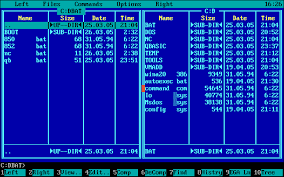
In the 1980s or early 1990s, the operating system that shipped with most PCs was a version of the Disk Operating System (DOS)created by Microsoft: MS-DOS.
MS-DOS is a disk operating system for IBM PC–compatible computers.
In its day, it was easily the most popularoperating system in the world.
Image result for dos

 INTERNAL COMMAND

1)Dir
2)Rename (Ren)
3)Delete (Del)
4)Copy
5)Type
6)Set Attributes (attrib)
Image result for dos
DOS has a way of showing which diskdrive is currently active. The floppy disk drives are assigned alphabets Aand B, whereas the hard disk driveis assigned the alphabet C.
Ex: If your PC includes a hard disk, besides a FDD (Floppy Disk Drive), the drive names would be A and C. If the prompt is A then it implies that the first floppy disk drive isactive. Where as the DOS prompt would be C, if the hard disk is active. Data as well as instructions reside in a file stored in a disk.


IMPACTS OF COMPUTER

The Impact Of Computers

Computers are commonly used items in many areas. It is an important thing to people, especially the people who run organizations, industry, etc. . . Almost anything you know is run or made by computers. Cars and jets were designed on computers, traffic signals are run by computers, most medical equipment use computers and space exploration was started with computers. Most of the jobs today require the use of computers. These 'mechanical brains' made a huge impact on our society. It would be hard if we didn't have the computer around. 

Let's visualize for a minute. Let's visualize a world without computers. People in the medical field wouldn't have have found a lot of cures to diseases, since most cures were found with the help of computers. Movies like Jurassic Park, Toy Story, A Bug's Life or Godzilla would never have been made without computers because they used computer graphics and animation in them. Pharmacies would have a hard time keeping track with what medications to give to patience. Counting votes would be impossible without computers and most importantly, space exploration wouldn't be possible without the help of computers. It's a pretty tough life without computers. Some may not agree and say, "Well, we don't need computers to live on." They maybe right but mostly, they are wrong. Computers help in curing diseases, make entertainment a lot better, keep track of important records, etc. . . Without computers, all this wouldn't be possible. 

History of the Computer 

Computers weren't as technological and complex like the ones we know. Early computers didn't use chips or monitors. They weren't as small nor big like the ones today. Back in the early 1600 to 1800s, people had theories,plans, or ideas of making a device that could do complex problems and mathematics so that they wouldn't keep writing down problems and solve them manually. They wanted a device that could add and subtract. Many of them started building such a device. They called this device the calculator or computer, since it calculates. The first digital calculator which could add and subtract was made by Blaise Pascal, a famous mathematican. Many more people had their own versions of the calculator as well. Pretty soon, many calculators/computers were being made. 

As years passed by, newer calculators or computers were being invented one after the other. In 1671, Gottfried Wilhelm von Leibnitz invented a small computer, not the advanced technolical ones, that could add and multiply. Soon after, Charles Xavier Thomas built a newer calculator that could add, subtract, multiply, and divide. His invention was the first to become commercially succesful. Most inventions and their inventors were inspirations to other people and wanted to continue their work and improve the calculator/computer their way. To the right is Gottfried Wilheim von Leibnitz, one of the great inventors of the first calculator that could add and multiply. Image came from http://www.maxmon.com/1670ad.htm. 

Probably one of the first complex computer that was an important part of the computer's history was ENIAC, Electronic Numerical Integrator and Computer/Calculator. This computer was big. It took a large room to fit this big computer in. ENIAC could do thousands of calculations, which it was made for. It was made by Presper Eckert, John W. Maulchy, and their associates. ENIAC was made during World War II so it was also used to calculate movement and strategies for the military during the war. It was very helpful for the Allied forces, especially America, during WWII. Computers have a long history to explain. Many scientists, inventors and computer technicians worked hard to make the computer and that hard work paid off. All the people who helped make the computer went down in history for doing so. The computer helped out the world a lot. You will see how in the next section. 

The Major Impact Image result for IMAGE OF COMPUTER IMPACT

Computers changed the world a lot. It helped man step forward into the future. Thanks to computers, space exploraation came true, new designs of vehicles and other trasportaion were made, entertainment became more entertaining, medical science made more cures for diseases, etc. . . The computers impacted our lives in many ways. You may not notice it but they did make life a lot easier. Without computers, the world would be a harder place to live in. Thanks to the computers, everyday life is easier for us. Some people may disagree but most wouldn't. Some people say that computers are taking away man power. That maybe true but computers did make the impossible possible. 

Computers impacted many items in today's society. One area the computer impacted on is the business area. Business uses computers for keeping track of accounts, money, or items that they need. You may notice business people using computers a lot, especially the laptop computers, portable computers that can be taken to your work area. You may see people use things like pie-charts and graphs when they present information to other business people in meetings. Most of those charts were made by computers. The business field uses the computers a lot for their companies and organizations. 

Another area computers impacted on is the entertainment area. Most of the people out there like science fiction or action movies, especially the ones with the neat looking effects. Well, those graphics were mostly made by computers. Most of the movies today use computer graphics to make things more realistic but not real. Computer graphics are mostly used on spaceships, aliens, monsters, and special effects. To the left is a picture from the movie "Godzilla." Godzilla was created by computer animation, texturing, and graphics to make him more realistic then the older version when they used a man in a costume to play godzilla. This wasn't the only movie made with computers. Movies like Jurassic Park, Wing Commander, Starship Troopers, Star Wars SE, and the latest Star Trek Movies used computers to make them look more interesting and realistic. There are even movies completely made by computers like Toy Story and A Bugs' Life. 

Not only movies used computer animations and graphics. Games on the latest game consoles like the PC, Playstation and Nintendo 64 used the computers to make the coolest games ever. Of course all of you heard of the game Final Fantasy VII. It was the first Final Fantasy game to have a 3D environment and neat computer animation. It was a big money-making seller. Games now and days use computer graphics and animations to make the coolest games. Computer games also have their share. Wing Commander Prophecy, Shogo and all the other new 3D games were made by really cool computer graphics. It would be really boring without all this wouldn't you think? That's how computers impacted today's entertainment. 
Image result for IMAGE OF COMPUTER IMPACT IN GRAPHICS

Education was impacted by computers as well. Computers help out students in a lot of today's projects and essays. If a student were to do an essay on the planet Saturn, they could look in an electronic encyclopedia in the computer or they could look up their topic on the internet. They could also type their essays and reports on what's called a word-processing program. This program allows you to type anything out from a school essay to business papers. You can make your paper look very neat by adding images and neat looking text to impress your teacher. Now and days, typing out essays and reports are mandatory, especially in High School. Computers help students in any way they need, researching, typing, searching, etc. . . Teachers use computers as well. They use computers to keep track of grades, type out instruction for their students, and to let students use the computer for school purposes. Image result for IMAGE OF COMPUTER IMPACT IN HOSPITAL

An important field computers impacted on is the medical field. The computers helped the hospitals out very much. In pharmacies, the pharmacists use computers to keep a record of what medication to give to a patient and the amount they need. Most computers in the hospital are used to keep data of patience and their status. Computers also keep track of equipment placement and status as well. Scientists need the help of computers to find cures for diseases that need cures like cancer and STDs. Without the computers help, cures for a lot of diseases woudn't have been found. Computer helped the medical area a lot and we are greatful for that since they keep track of our health. Other areas the computer impacted on is space exploration and designs of transportation.
Image result for IMAGE OF COMPUTER IMPACT IN HOSPITAL

LINUX OPERATION


  • https://blogger.googleusercontent.com/img/b/R29vZ2xl/AVvXsEi3N0xnhwgloDTv7atcsaekdjur3xsVKG9UpFxzRoYYyjLBvl1PwkC8jgpqS3rJjg2WjlmIRtIpgOaLKvNiQI15omoN9NHP7VDQNlmT6ejazNx9Yhx5ISycN4M11CVpC2HsLlBhyphenhyphenuFbobjf/s1600/24.jpg  LINUX APPLICATION

    The software packages are somewhere in the online repositoies, APT handles a local database on the user's hard drive that contains information's about the available packages and where they are located. So when the types the command, apt-get install conky, the APT will start finding the package named conky in the database and will install conky once user types 'y' (yes). To get the all newly uploaded packages on the repositories, user need to update APT regularly.
    To update APT database:
    apt-get update
    To update the APT database and also upgrade the security updates and patches that might be available for some installed softwares, users may do it at once just by using the commands like this: apt-get update; apt-get upgrade
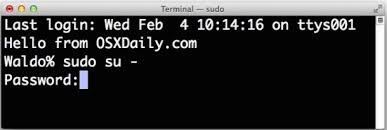
    And remember all of the package management tools I am discussing, will need user to be in root or superuser, for example to install software in debian based distributions you will use apt-get followed by sudo then It will ask you to enter password.

    sudo apt-get install conky
    sudo apt-get remove conky
    sudo apt-get update
    Insert password to install any package
    yum: For RPM based Linux distributions, like, Fedora, Red HatYou will not have any trouble understanding yum because its same as apt-get. As 'apt-get' installs software packages for Debian packages, like that 'yum' installs software packages for RPM packages. It can also like apt-get download and install packages from a repository.Image result for image of insert password to start in linux
      Yum install ${packagename}
    To remove software packages, just use remove
    yum remove ${packagename}
    There is one thing to note that yum does not keep a local database by default in user's hard disk. So there is no need to update it. But to install available security paches and bug fixes, use the following command:
    yum update
    If user wants to update any single package then do it in the following way:
    yum update ${packagename}
    Tar Balls
      You would remember in Windows you've Zip files .zip or in Mac .sit. The same way here in Linux you have Tar Balls (files) ending with extentions, like, .tar, .tar.gz, .tgz, or something else. To unpack a tar ball (file), use the following command:
    tar -xzvf ${filename}.tar.gz
    The parameters are x to extract files, z to filter through gzip for decompression (leave this off if the file does not have a gz extension), v for verbose mode so you can tell what’s going on, f indicating there will be a filename to follow. You may want to create an alias called “untar” that feeds in these options if you have a hard time remembering command line options as I do.
    The command will not install the software, but it will extract the archived files. After extracting files then you can install the extracted files by reading README file or INSTALL file (because there you can instructions for installing those particular files).
    BASIC LINUX COMMANDS
     

    Command
    Description
    cat [filename]
    Display file’s contents to the standard output device
    (usually your monitor).
    cd /directorypath
    Change to directory.
    chmod [options] mode filename
    Change a file’s permissions.
    chown [options] filename
    Change who owns a file.
    clear
    Clear a command line screen/window for a fresh start.
    cp [options] source destination
    Copy files and directories.
    date [options]
    Display or set the system date and time.
    df [options]
    Display used and available disk space.
    du [options]
    Show how much space each file takes up.
    file [options] filename
    Determine what type of data is within a file.
    find [pathname] [expression]
    Search for files matching a provided pattern.
    grep [options] pattern [filesname]
    Search files or output for a particular pattern.
    kill [options] pid
    Stop a process. If the process refuses to stop, use kill -9 pid.
    less [options] [filename]
    View the contents of a file one page at a time.
    ln [options] source [destination]
    Create a shortcut.
    locate filename
    Search a copy of your filesystem for the specified
    filename.
    lpr [options]
    Send a print job.
    ls [options]
    List directory contents.
    man [command]
    Display the help information for the specified command.
    mkdir [options] directory
    Create a new directory.
    mv [options] source destination
    Rename or move file(s) or directories.
    passwd [name [password]]
    Change the password or allow (for the system administrator) to
    change any password.
    ps [options]
    Display a snapshot of the currently running processes.
    pwd
    Display the pathname for the current directory.
    rm [options] directory
    Remove (delete) file(s) and/or directories.
    rmdir [options] directory
    Delete empty directories.
    ssh [options] user@machine
    Remotely log in to another Linux machine, over the network.
    Leave an ssh session by typing exit.
    su [options] [user [arguments]]
    Switch to another user account.
    tail [options] [filename]
    Display the last n lines of a file (the default is
    10).
    tar [options] filename
    Store and extract files from a tarfile (.tar) or tarball (.tar.gz or .tgz).
    top
    Displays the resources being used on your system. Press q to
    exit.
    touch filename
    Create an empty file with the specified name.
    who [options]
    Display who is logged on.


  • MICROSOFT WINDOW ENVEROMENT

    MICROSOFT WINDOW  ENVEROMENT


    Microsoft Windows (or simplyWindows) is a metafamily of graphical operating systems developed, marketed, and sold by Microsoft. It consists of several families of operating systems, each of which cater to a certain sector of the computing industry with the OS typically associated with IBM PC compatible architecture. Active Windows families include Windows NT, Windows Embedded and Windows Phone; these may encompass subfamilies, e.g. Windows Embedded Compact (Windows CE) or Windows Server. Defunct Windows families include Windows 9x; Windows 10 Mobile is an active product, unrelated to the defunct family Windows Mobile.
    Microsoft introduced an operating environment named Windows on November 20, 1985, as a graphical operating system shell for MS-DOS in response to the growing interest in graphical user interfaces (GUIs).Microsoft Windows came to dominate the world's personal computer (PC) market with over 90% market share, overtaking Mac OS, which had been introduced in 1984. Apple came to see Windows as an unfair encroachment on their innovation in GUI development as implemented on products such as the Lisa and Macintosh (eventually settled in court in Microsoft's favor in 1993). On PCs, Windows is still the most popular operating system. However, in 2014, Microsoft admitted losing the majority of the overall operating system market to Android, because of the massive growth in sales of Android smartphones. In 2014, the number of Windows devices sold were less than 25% of Android devices sold. This comparisons, however, may not be fully relevant as the two operating systems traditionally targeted different platforms


    Managing Environment Variables
    System Variables
    You must be an administrator to modify a system environment variable. System environment variables are defined by Windows and apply to all computer users. Changes to the system environment are written to the registry, and usually require a restart to become effective.

    Image result for IMAGE OF DESKTOP IN SCREEN

    User Variables for User Name
    Any user can add, modify, or remove a user environment variable. These variables are established by Windows XP Setup, by some programs, and by users. The changes are written to the registry, and are usually effective immediately. However, after a change to user environment variables is made, any open software programs should be restarted to force them to read the new registry values. The common reason to add variables is to provide data that is required for variables that you want to use in scripts.
    To view or change environment variables: Click Environment variables
    Click one the following options, for either a user or a system variable:
    Click New to add a new variable name and value.
    Click an existing variable, and then click Edit to change its name or value.
    Click an existing variable, and then click Delete to remove it.
    Right-click My Computer, and then click Properties.
    Click the Advanced tab